


In the era of big data and artificial intelligence, web scraping for Data Science has become an indispensable skill for data scientists, analysts, and researchers. With over 1.8 billion websites on the internet, the ability to extract, process, and analyze web data efficiently can provide competitive advantages, drive insights, and fuel machine learning models. This comprehensive guide explores cutting-edge web scraping techniques, practical Python implementations, and crucial legal considerations you must understand before extracting data from the web.
🎯 What is Web Scraping and Why It Matters for Data Science
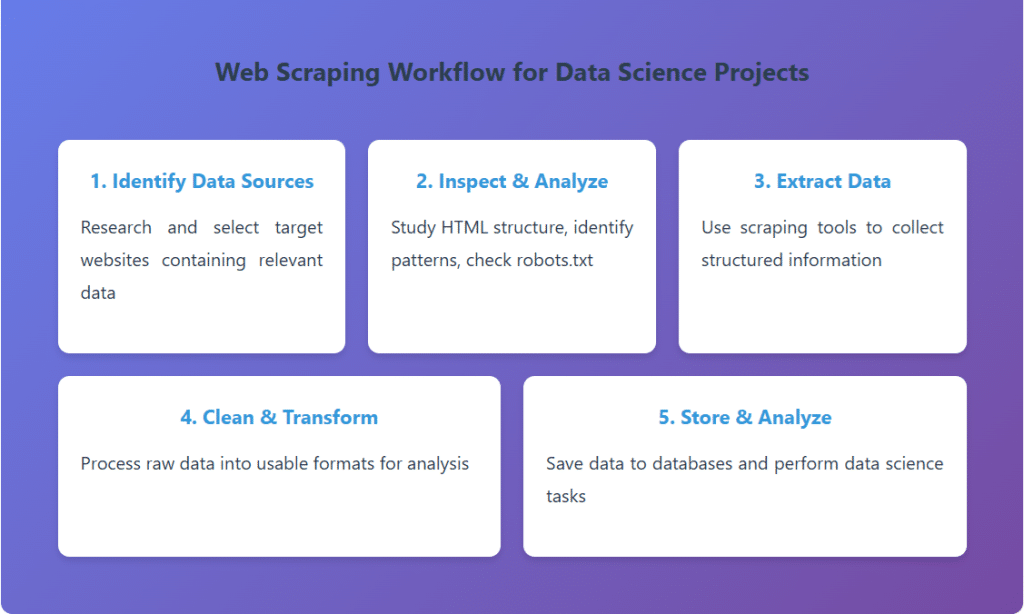
Web scraping, also known as web data extraction or web harvesting, is the automated process of extracting structured data from websites. Unlike manual data collection, web scraping uses bots or crawlers to systematically browse web pages and extract specific information according to predefined rules.
For data scientists, web scraping opens doors to vast datasets that would be impossible to collect manually. Whether you’re building sentiment analysis models from social media, tracking competitor pricing, gathering real estate data, or creating training datasets for machine learning algorithms, web scraping serves as the bridge between raw web content and actionable insights.
🛠️ Essential Web Scraping Techniques and Tools
1. Beautiful Soup: The Foundation of Web Scraping
Beautiful Soup is a Python library that makes it easy to scrape information from web pages. It creates a parse tree from page source code that can be used to extract data in a hierarchical and readable manner. Perfect for static websites and beginners, Beautiful Soup excels at parsing HTML and XML documents.
from bs4 import BeautifulSoup
import requests
# Fetch webpage content
url = 'https://example-website.com/products' response = requests.get(url) soup = BeautifulSoup(response.content, 'html.parser')
# Extract product information
products = [] for item in soup.find_all('div', class_='product-card'): product = { 'name': item.find('h3').text.strip(), 'price': item.find('span', class_='price').text.strip(), 'rating': item.find('div', class_='rating')['data-rating'] } products.append(product)
# Convert to DataFrame for analysis
import pandas as pd
df = pd.DataFrame(products) print(df.head())
2. Selenium: Mastering Dynamic Content
Modern websites heavily rely on JavaScript to load content dynamically. Selenium is a powerful browser automation tool that can interact with JavaScript-rendered pages, click buttons, fill forms, and extract data from single-page applications (SPAs). This makes it essential for scraping modern web applications built with React, Vue, or Angular.
from selenium import webdriver
from selenium.webdriver.common.by import By
from selenium.webdriver.support.ui import WebDriverWait
from selenium.webdriver.support import expected_conditions as EC
# Setup Chrome driver driver = webdriver.Chrome() driver.get('https://dynamic-website.com')
# Wait for JavaScript to load content
wait = WebDriverWait(driver, 10) element = wait.until( EC.presence_of_element_located((By.CLASS_NAME, 'data-container')) )
# Scroll to load more content (infinite scroll)
for i in range(5): driver.execute_script('window.scrollTo(0, document.body.scrollHeight);') time.sleep(2)
# Extract data
articles = driver.find_elements(By.CLASS_NAME, 'article')
data = [article.text for article in articles] driver.quit()
3. Scrapy: Enterprise-Level Web Crawling
Scrapy is a fast, high-level web crawling framework designed for large-scale web scraping projects. It provides built-in support for selecting data, following links, handling cookies, managing concurrent requests, and storing data efficiently. Data scientists working with big data projects prefer Scrapy for its speed and scalability.
import scrapy
class ProductSpider(scrapy.Spider): name = 'product_spider'
start_urls = ['https://ecommerce-site.com/category']
def parse(self, response):
# Extract product data
for product in response.css('div.product'): yield { 'name': product.css('h2::text').get(), 'price': product.css('span.price::text').get(), 'url': product.css('a::attr(href)').get() }
# Follow pagination links
next_page = response.css('a.next::attr(href)').get() if next_page is not None: yield response.follow(next_page, self.parse)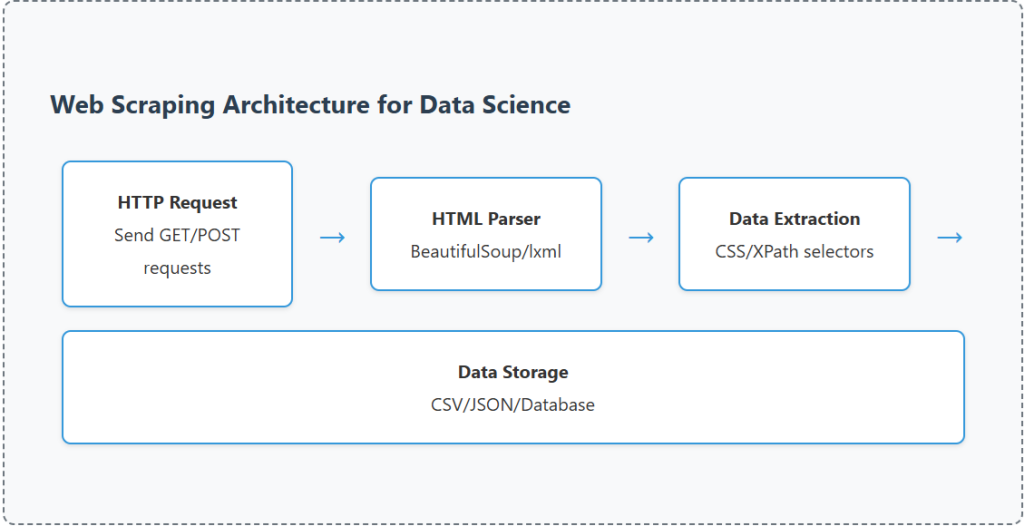
📊 Comparison of Popular Web Scraping Tools
| Tool | Best For | Speed | JavaScript Support | Learning Curve |
|---|---|---|---|---|
| Beautiful Soup | Static HTML, Small projects | Medium | ❌ No | Easy |
| Selenium | Dynamic content, Browser automation | Slow | ✅ Yes | Medium |
| Scrapy | Large-scale projects, Production | Very Fast | ⚠️ With middleware | Steep |
| Playwright | Modern SPAs, Cross-browser testing | Fast | ✅ Yes | Medium |
| Puppeteer | Chrome automation, Screenshots | Fast | ✅ Yes | Medium |
⚡ Advanced Web Scraping Techniques
Handling Anti-Scraping Mechanisms
Modern websites implement various anti-scraping technologies to protect their content. Here are proven techniques to overcome common challenges:
- User-Agent Rotation: Rotate browser user-agents to mimic different browsers and avoid detection
- Proxy Rotation: Use rotating proxies to distribute requests across multiple IP addresses
- Rate Limiting: Implement delays between requests to avoid triggering rate limiters
- Session Management: Maintain cookies and sessions for authenticated scraping
- CAPTCHA Solutions: Integrate services like 2captcha or Anti-Captcha for automated solving
import random import time
# User-Agent rotation
user_agents = [ 'Mozilla/5.0 (Windows NT 10.0; Win64; x64) AppleWebKit/537.36', 'Mozilla/5.0 (Macintosh; Intel Mac OS X 10_15_7) AppleWebKit/537.36', 'Mozilla/5.0 (X11; Linux x86_64) AppleWebKit/537.36' ]
def scrape_with_protection(url): headers = { 'User-Agent': random.choice(user_agents), 'Accept': 'text/html,application/xhtml+xml', 'Accept-Language': 'en-US,en;q=0.9', 'Referer': 'https://www.google.com/' }
# Random delay to mimic human behavior time.sleep(random.uniform(2, 5)) response = requests.get(url, headers=headers) return response
Parsing Complex Data Structures
Real-world websites often contain nested data structures, paginated results, and dynamically loaded content. Here’s how to handle these scenarios efficiently:
import json
import re
# Extract JSON data embedded in HTML
def extract_json_data(html_content):
# Find JSON data in script tags
pattern = r'var productData = ({.*?});' match = re.search(pattern, html_content, re.DOTALL) if match: json_str = match.group(1)
data = json.loads(json_str) return data return None
# Handle pagination automatically
def scrape_all_pages(base_url, max_pages=10): all_data = [] for page in range(1, max_pages + 1): url = f'{base_url}?page={page}' response = requests.get(url) soup = BeautifulSoup(response.content, 'html.parser') items = soup.find_all('div', class_='item') if not items: break all_data.extend([parse_item(item) for item in items]) return all_data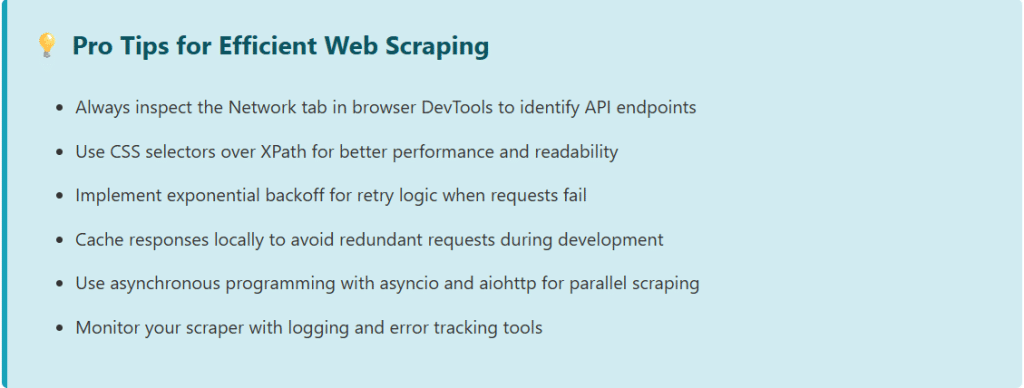
⚖️ Legal Considerations and Ethical Web Scraping
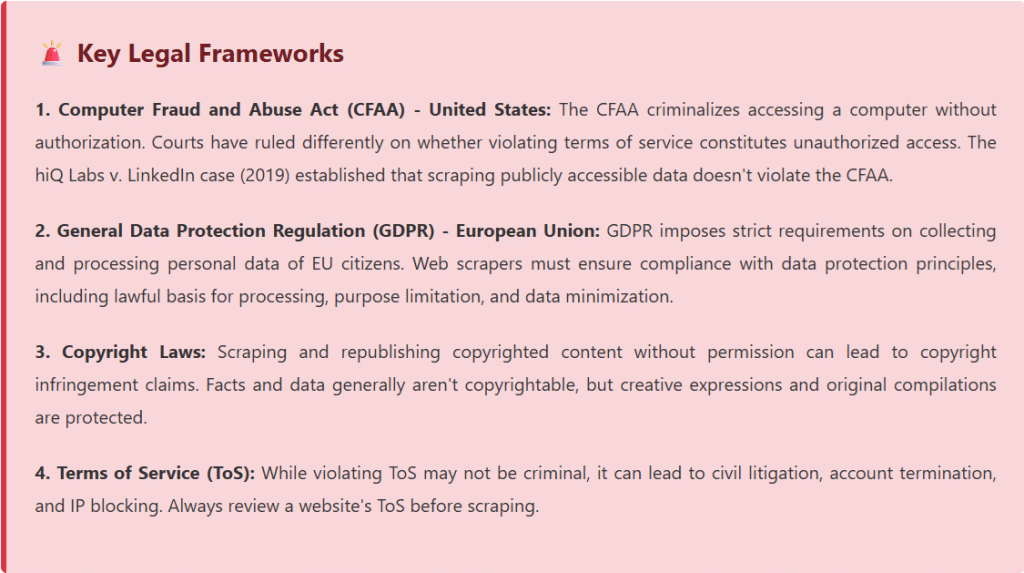
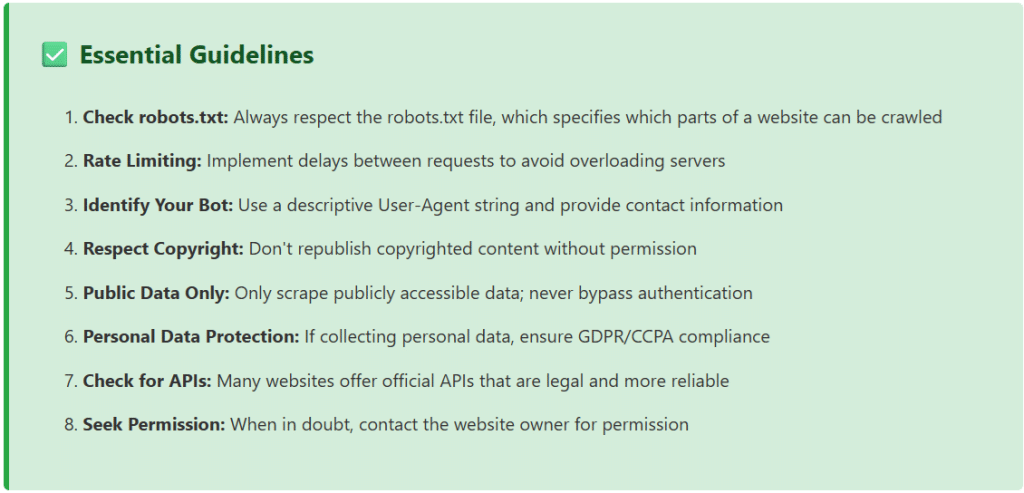
The legal landscape surrounding web scraping is complex and varies by jurisdiction. While web scraping itself is not illegal, how you scrape and what you do with the data can have significant legal implications. Understanding these boundaries is crucial for any data science professional.
Best Practices for Legal and Ethical Scraping
import urllib.robotparser
# Check robots.txt before scraping
def can_fetch(url): rp = urllib.robotparser.RobotFileParser() rp.set_url(f'{url}/robots.txt') rp.read()
# Check if our bot can fetch the URL
user_agent = 'DataScienceBot/1.0 (+http://yoursite.com/bot-info)' return rp.can_fetch(user_agent, url)
# Example usage if can_fetch('https://example.com/data'): print('Allowed to scrape') else: print('Scraping not allowed by robots.txt')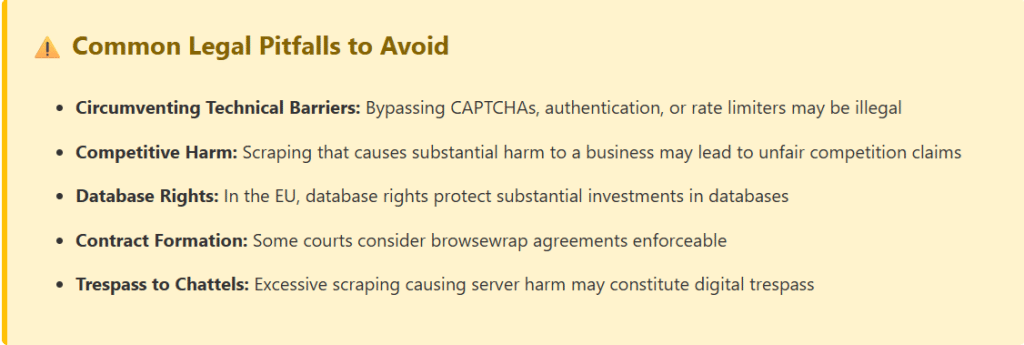
📈 Real-World Data Science Applications
1. E-Commerce Price Intelligence
Monitor competitor pricing in real-time to optimize pricing strategies. Scrape product listings, prices, stock availability, and customer reviews across multiple platforms to build dynamic pricing models.
2. Sentiment Analysis and Social Listening
Extract social media posts, reviews, and comments to analyze public sentiment about brands, products, or events. This data feeds natural language processing models for trend detection and reputation management.
3. Financial Market Analysis
Scrape financial news, stock prices, earnings reports, and economic indicators to build predictive models for trading algorithms and risk assessment.
4. Real Estate Market Research
Collect property listings, prices, neighborhood data, and historical trends to create valuation models and identify investment opportunities.
5. Academic Research and Dataset Creation
Build custom datasets for machine learning research by scraping scientific publications, patent databases, or public records for specific research domains.
# Complete workflow: Scrape, Clean, Analyze
import pandas as pd
import matplotlib.pyplot as plt
from textblob import TextBlob
# 1. Scrape product reviews
def scrape_reviews(product_url): reviews = []
# Scraping logic here return reviews
# 2. Clean and process data
def clean_reviews(reviews): df = pd.DataFrame(reviews)
df['text'] = df['text'].str.lower().str.strip()
df['rating'] = pd.to_numeric(df['rating'])
return df
# 3. Sentiment analysis def analyze_sentiment(df):
df['sentiment'] = df['text'].apply( lambda x: TextBlob(x).sentiment.polarity )
return df
# 4. Visualization def visualize_insights(df):
plt.figure(figsize=(12, 6))
plt.subplot(1, 2, 1)
df['rating'].value_counts().plot(kind='bar')
plt.title('Rating Distribution')
plt.subplot(1, 2, 2)
df['sentiment'].hist(bins=30)
plt.title('Sentiment Score Distribution')
plt.tight_layout()
plt.show()
🔧 Data Storage and Pipeline Integration
Effective web scraping extends beyond data extraction. Building robust pipelines that store, process, and serve scraped data is crucial for production data science workflows.
Storage Solutions
- CSV/JSON Files: Simple storage for small to medium datasets
- SQLite/PostgreSQL: Relational databases for structured data with complex queries
- MongoDB: NoSQL database ideal for semi-structured and nested data
- AWS S3/Google Cloud Storage: Scalable cloud storage for large datasets
- Data Warehouses: BigQuery, Snowflake, or Redshift for analytical workloads
import sqlite3
import pandas as pd
# Save scraped data to SQLite database
def save_to_database(data, db_name='scraped_data.db'): conn = sqlite3.connect(db_name)
df = pd.DataFrame(data)
# Create table with timestamp
df['scraped_at'] = pd.Timestamp.now()
df.to_sql('products', conn, if_exists='append', index=False) conn.close()
print(f'Saved {len(data)} records to database')
🚀 Scaling Your Web Scraping Operations
As your data science projects grow, you’ll need to scale your scraping infrastructure. Here are proven strategies for handling large-scale web scraping:
- Distributed Scraping: Use Scrapy with Redis or Celery for distributed crawling across multiple machines
- Cloud Deployment: Deploy scrapers on AWS Lambda, Google Cloud Functions, or containerized solutions with Docker and Kubernetes
- Scheduling and Automation: Use Apache Airflow, Prefect, or cron jobs for scheduled scraping tasks
- Monitoring and Alerting: Implement logging, error tracking with Sentry, and performance monitoring with Prometheus
- Data Quality Checks: Validate scraped data with schema validation and anomaly detection
🎯 Conclusion
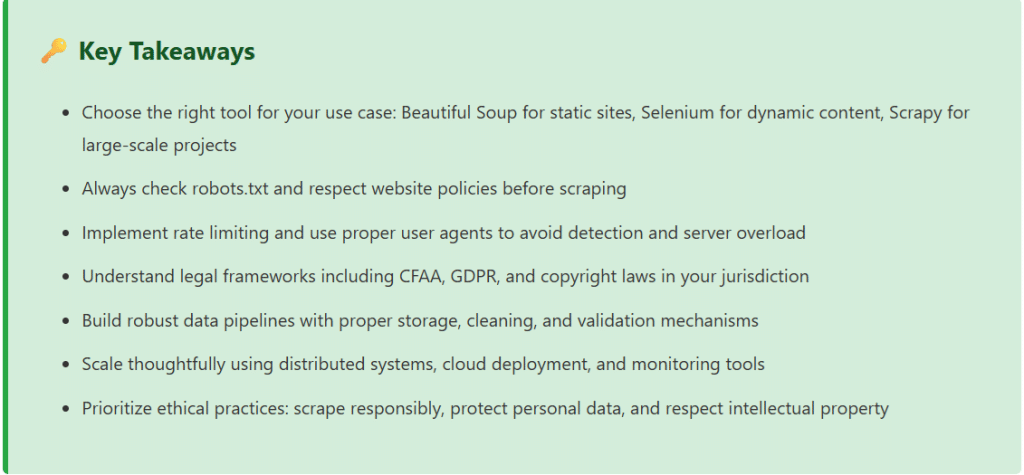
Web scraping for data science is a powerful technique that enables professionals to gather valuable insights from the vast ocean of web data. Throughout this guide, we’ve explored essential tools like Beautiful Soup for static content, Selenium for dynamic websites, and Scrapy for enterprise-scale projects. We’ve covered advanced techniques including anti-scraping mechanisms, proxy rotation, and efficient data extraction patterns.
However, technical proficiency must be balanced with ethical responsibility and legal compliance. Always respect robots.txt files, implement rate limiting, and understand the legal frameworks governing web scraping in your jurisdiction. The CFAA, GDPR, copyright laws, and terms of service create a complex legal landscape that requires careful navigation.
As you build your web scraping projects, remember that the goal is not just to extract data, but to create value while respecting the rights of content creators and website operators. Use official APIs when available, seek permission for large-scale scraping, and always prioritize publicly accessible data over circumventing security measures.
The future of data science depends on access to diverse, high-quality datasets. Web scraping, when done responsibly, democratizes access to information and enables innovation across industries from e-commerce to healthcare, finance to academic research. By following the best practices outlined in this guide, you’ll be well-equipped to harness the power of web data for your data science projects while maintaining ethical standards and legal compliance.
You can use some practical material from here Web Scraping for Data Science
[datawitzz_excel_player videos=”_mupQPMXcZs,fhkTBoHUQpI,aJkNkq10AqI” titles=”Sum with Error in Cells|Index Function In Excel|HLOOKUP in Excel”]DataWitzz Excel Quiz
Enter your details to begin the quiz